


- By Inessa Peters
- Juni 13, 2026
- Comments 2
Manually Deleted Peaks
How to Identify Manually Deleted Peaks in Empower™ CDS
Manually deleting peaks in Empower is one of the most critical actions from a GMP perspective.
As a data reviewer, you should always be able to identify whether peaks were deleted and verify that the action was properly documented and justified.
You probably already check the Manual column.
But a checkmark only tells us that some manual action was performed.
- But what exactly was done?
- Was the integration adjusted?
- Was a drop line deleted?
- Was an entire peak deleted?
- Or were several manual actions performed within the same result?
- Unfortunately, the Manual flag doesn’t tell us.
To identify manually deleted peaks, you need to look for the I03 Result Code, which means: User manually deleted a peak.
Option 1 | Check Result Codes Manually
You can find Result Codes in:
Review Window → Results Window
If a result contains the code I03, a peak was manually deleted.

Option 2 | Create a View Filter
Manually checking Result Codes for every result within a Result Set can become time-consuming.
A faster approach is to create a View Filter in the Results Tab.
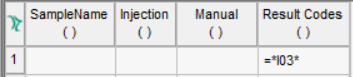
- Results Tab → Edit View
- Add the column: Result Codes
- Create the condition:
=*I03* - Save the View Filter.
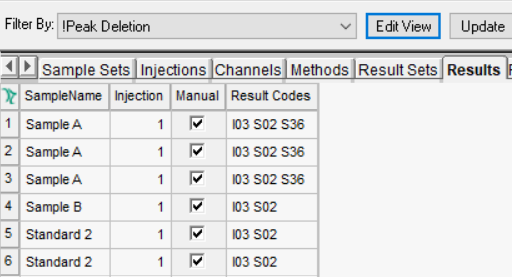
This filter will display only results containing the I03 Result Code.
Use Case 1 - Routine Data Review
When reviewing a Result Set, you can quickly identify all results where peaks were manually deleted.
No need to inspect every result individually.
Use Case 2 - Periodic Data Review
The same View Filter can also be applied to an entire project.
This allows you to identify all manually deleted peaks over a defined period and review whether they were properly documented.
For an even better overview, add the column: Result Comments
This allows you to immediately see whether the action was documented and justified.
The Manual checkbox is useful.
But when you need to understand what was changed, Result Codes often provide much more valuable information.
And sometimes a simple View Filter can save a lot of review time.
Want to Improve Your Data Review in Empower?
If you would like to:
- improve visibility of manual integration
- automate manual integration detection
- optimize your review workflows
- create useful Custom Fields
- reduce time spent during review
feel free to reach out.
We regularly support QC laboratories with practical Empower CDS workflow optimization and mentoring.
Book a free 25-minute consulting session to discuss your setup and challenges.
If you need any further support with Empower, you can also explore our trainings, hands-on workshops, and mentoring program, designed for analytical laboratories working in GMP-environments.
Galeriafolk
September 3, 2026This just made my whole day brighter, thank you for sharing
Galeria Folk
September 3, 2026Thanks for consistently showing up with quality content that matters to people